|
||||
|
Monday, September 15
[02:48PM EDT]
David Akin has been fiddling with Blogware and has penned a decent entry detailing his observations and best of all, problems, with the tool so far.
Changing to a custom URL is pretty straightforward with Blogware (even if I haven't written that part of the documentation yet ;). Simply go to the Settings tab in your control panel and change the "Blog URL" to whatever hostname you iwsh. Note that this will a) have the effect of forcing all inbound links to your blog to break - which isn't an issue this early into the blog's lifespan (unless you count this post). And b) that you must have a DNS server that can serve records for the URL that you've set up. If you are using a blogware.com subdomain, we take care of this for you. If you want to use something custom at a domain name that you own (like blog.davidakin.com) you must create a CNAME that points blog.davidakin.com to users.blogware.com (wherein we take care of the rest). If you don't create a CNAME on the DNS server that is authoritative for davidakin.com, then your blog will no longer resolve. As far as the demonic behavior of the help files goes, I believe that a quick Javascript exorcism this morning has solved the problem. We've lost the dynamic tree control, but stand to gain a lot of nice new Mac using friends. Lastly, auto-excerpts can indeed be changed to suit the publisher's preference. We default it to twenty words, but if this is too few or too many, you can modify the default from the main Settings tab. Scroll down to near the bottom - there's a text entry box labelled "Excerpt Word Size". Changing this value will change the number of words (not characters as the page incorrectly notes - we'll fix that!) generated when Blogware generates excerpts on your behalf. C | T (94) | # Thursday, August 7
[08:57PM EDT]
Courtesy of the masterful Paul Sisson, we've got a few new stylesheets to play with. If you want to change the look and feel of your Blogware, simply follow these quick instructions:
***Note, you must be using the default templates in order for these instructions to work. If you are not using the default template, send me an email and I will send you some further instructions.
That's it - you should now be sporting some funky new colors and a slightly different way of looking at things. Best of all, everything is compatible with the Layout Manager which means you can easily manage the look and feel of your Blog. C | T (76) | # Wednesday, August 6
[08:26PM EDT]
Brett asks, "What's the filesystem on Blogware?"
Strictly speaking, there is no file system. Blogware is an application run entirely from a database. Every word, picture and HTML file that makes it into your Blogware account is stored in a database until some one asks for it. And when they do, we retrieve, format it according to the templates that you've set and then sent it out via HTTP. So what's the blog extension in the URL all about? Its an artifact of how we pull things out of the database. You'll notice that sometimes it is displayed, and sometimes its not - and even if it isn't, the system still assumes that its there. In each case, the term "blog" will come before the applicable category and filename - ie http://yourblog.blogware.com/blog/mystuff/photos/birthday.html. Make sense? C | T (53) | # Wednesday, July 30
[08:23AM EDT]
I've got something very exciting to tell you Blogware'ers about.
Bookmarklets. "What is a bookmarklet?" do I hear you ask? Well, in the Blogware context, they are little hotlinks that you can drag to your browser tool bar where they will sit until you need them. "Why would I need them?" Patience, dear reader. Have you ever want to save a website address to your blogroll or list of favorites on your Blogware for all of *your* readers to see and use? Have you even been reading a nifty article and the Register, CNN or Doc Searls weblog and think to yourself "This is bullshit, I should really post a rebuttal to my Blogware." (or int he case of Doc Searls, "this is spot on, I should post a link to my Blogware.") Well, bookmarklets make it easy to accomplish both of these tasks. We've created two for you to use - one that adds the link of the current website to any blogroll or favorites list that you select and the other that pulls up a window that allows you to post a link to the page that you are currently browsing along with your editorial directly to your blog. Using them is simple. PV4 users can simply log in to their Blogware administration control panel, and select the "Bookmarklets" sub-tab from the main window. Once the new page has loaded, you should be looking at a control panel page that includes two links; one labelled "Post to 'name of your blog'" and the other "Add Favorite". To add them to your browser, simply click on the link you wish to add and instead of releasing your mouse button, hold it down and "drag" the link to the "Links" menu in Internet Explorer and release the mouse button. If it works, a security warning should pop up and let you know that this may not be a safe link to add (you can ignore this, it is perfectly safe ;). Once you select "Okay" to ignore the security warning, you should have a link in your Links menu that says "Post to 'name of your blog'" or, if you selected the other link , one that says "Add Favorites". You can experiment with both of these buttons once you've installed them - they work exactly like the functions found elsewhere in Blogware - think of them as "Blogware to go" and you'll be just fine. One last note: this is very fresh code. I've noticed a few minor bugs already - like the HTML editor doesn't work as designed with the "Post" bookmarketl. No worry, we're on the case and should have this ironed out reallllll quick. Leave your comments or drop me a note if you have any questions. C (2) | T (42) | # Tuesday, June 10
[01:30AM EDT]
PV3 features are slowly but surely being added to the live codebase. This evening basic invitations, notify on post, notify on comment and a bunch of other improvements were promoted.
I will publish a more complete list later this week - in the meantime, have fun poking around... C | T (340) | # Friday, June 6
[12:36AM EDT]
There are a few new features that have popped up over the past few days...and a few new bugs.
Feature wise, I already mentioned FTP support via the file manager. This is great stuff. For instance, you can use it to upload a playlist as text via Windows Media Player, include it in a Private Template Variable and display it in the navigation panel of your blog. Its also easier to manage files within your file manager, create new albums and categories and a few other spiffy tidbits here and there. One of the downsides is that the pathname conventions have changed. This means that anything that you previously uploaded and displayed in your blog (not in your photoalbums - they still work just fine) is now a borked link. We are no longer using the "_mediafile" convention in the path name. The path is now whatever you choose when you upload the file originally...(ie - ross.blogware.com/photos/birthday/ross1.jpg). All you need to do is go back to the article with the borked link and simply edit the file names. Not optimal, but I might try to talk Tom into scripting a server wide fix for this - maybe, don't hold your breath - we're still in Alpha testing :) C | T (55) | # Thursday, June 5
[11:43PM EDT]
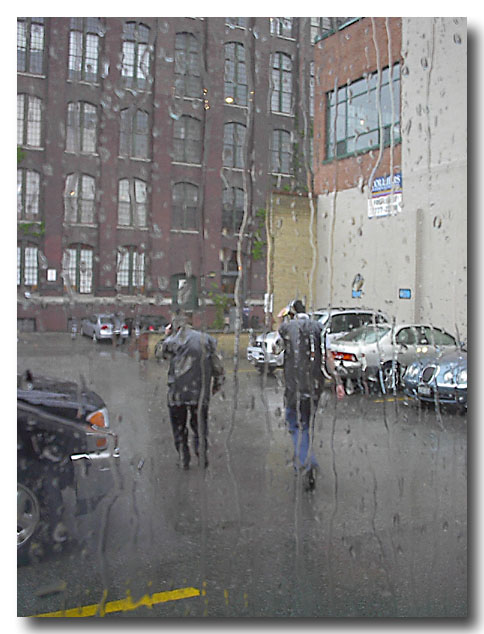 Rain isn't that exciting. At least not as exciting as the fact that I've uploaded this entire posted via w.bloggar. What's so exciting about that you say? Well, w.bloggar requires FTP access to post images to the remote webserver where the blog lives. But because Blogware is completely driven from a database it didn't make sense to provide FTP access to the file system. So we decided to let you FTP directly into the DB. Rain isn't that exciting. At least not as exciting as the fact that I've uploaded this entire posted via w.bloggar. What's so exciting about that you say? Well, w.bloggar requires FTP access to post images to the remote webserver where the blog lives. But because Blogware is completely driven from a database it didn't make sense to provide FTP access to the file system. So we decided to let you FTP directly into the DB.
Which means that I can now post pictures via w.bloggar directly to my blog. That sounds doubleplusgood to me. C | T (9) | # |
Blogroll 2.0
Make a Donation to the Tour For Kids!
Twitterings
 Search
 "Random Bytes" is a produced for and by Ross Rader. Everything else is just a happy byproduct. The views expressed here belong to me and not my employer.. Contact Me
Feel free to use my contact information to get in touch for work related items. email: ross@tucows.com tel. +1.4165385492 cel. +1.4168288783 MSN. ross@tucows.com Recent Articles
Recent Comments
Recent Visitors
jamessmithforum - Tue 15 Dec 2009 03:21 AM EST
ahmed100 - Tue 08 Dec 2009 06:49 AM EST
Andrew C - Fri 04 Dec 2009 09:57 PM EST
maxvoice - Mon 30 Nov 2009 06:33 AM EST
ahmed1212 - Thu 19 Nov 2009 09:20 PM EST
Login
|
|||
|
||||

